
Building TITAN Glass as a real Google Glass project
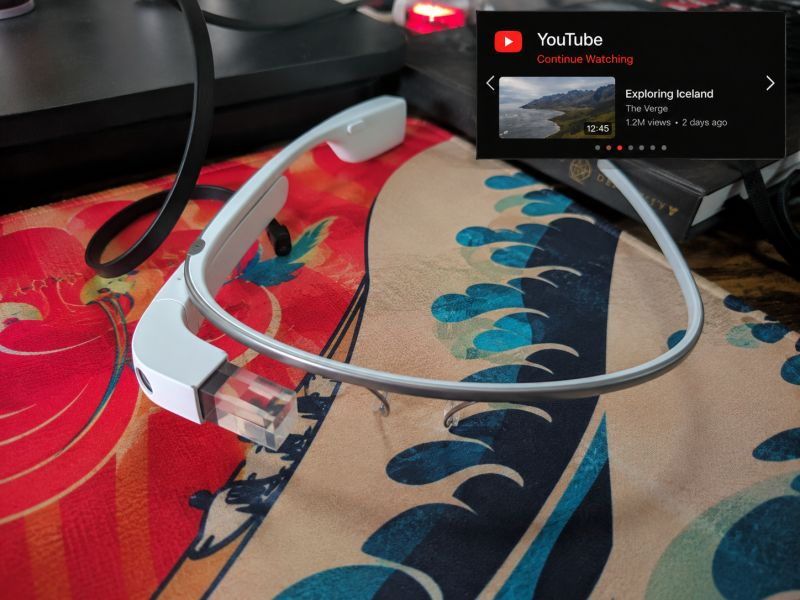
One of my side projects this week has been bringing an old Google Glass Explorer Edition back to life. It is 2013 hardware talking to a modern Blazor app running in Azure, with a custom TITAN Glass interface on the device and a desktop companion bridge on the other side.
The idea that made this worth it
The goal is simple: make Google Glass useful as a private companion surface for TITAN and my own workstation. I want it to show small cards, system state, notifications, and approved actions without turning the headset into a cluttered phone UI or a dangerous remote control panel.
That last part matters. Wearables are not good at everything. They are good at fast context. They are good at quick confirmation. They are good at giving you one useful thing while your hands and eyes are mostly on the real task. That is the lane I am building for.
Seeing the first custom notification pop up on the display made it worth the trouble. At that point it stopped feeling like a relic and started feeling like a tiny wearable dev tool.
What is running now
TITAN Glass is split across three main surfaces. The Glass app stays focused on rendering the wearable experience. The server owns device identity, cards, module state, command queues, uploads, and history. The Windows desktop companion runs locally in the notification area and reports workstation state back to the server.
That split keeps the responsibilities clean. The headset does not need to know how my workstation works. The server does not need to know random local executable paths. The desktop companion does not own the whole product. Each piece has a job, and the system gets more useful when those jobs stay narrow.
Glass renders the custom launcher and modules, the server brokers state and requests, and the Windows companion executes only local allowlisted actions.
The Weather module proof
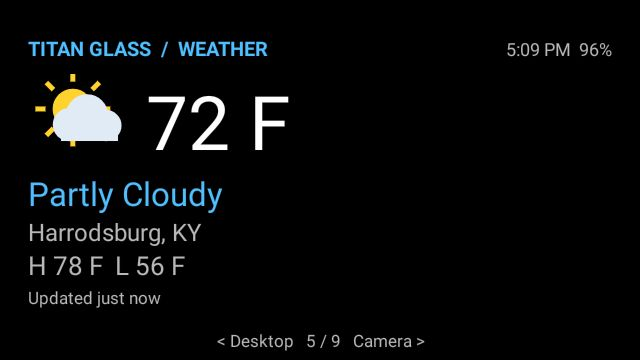
This screenshot is the part that made the project feel real. The UI is not a mockup. It is running on the actual Glass display with a custom module shell, status area, battery indicator, paging hints, and weather data coming from the bridge.
The constraints are sharp in a good way. A 640x360 wearable display does not give you room for decorative junk. The module has to be readable immediately: temperature, condition, location, high/low, freshness, and just enough navigation context to know where you are.
The private bridge
The server exposes a private Glass API for heartbeats, current cards, pending cards, command results, events, module state, quick GIF clips, and instant photo uploads. The device authenticates with a Glass device key, and the server can track whether a headset has been seen recently, what cards are waiting, and whether commands were acknowledged.
On the logged-in web side, I built a control center where I can register devices, queue cards, pick priority, set an accent color, preview the wearable card, and see recent device/card activity. It is not meant to be a public social product. It is a private command and status hub for my own experiment.
The interesting part is how boring the API needs to be. Google Glass should poll, render, acknowledge, upload, and move on. The less magic hidden in the headset, the easier it is to keep the wearable surface stable while the backend grows.
The desktop companion
The next layer is the Windows desktop companion. It is a small tray app with status and settings screens, a core runtime for polling and heartbeats, local action handlers, logs, retries, and tests. The companion registers through the server, receives a token, sends machine state, checks for one queued action at a time, executes a typed handler, and reports a final status.
That opens the door for useful Glass-to-desktop workflows: lock the PC, adjust volume, mute, open an allowlisted local application, or run a configured build profile. It also lets the Glass Desktop card show whether the companion is online, which machine is connected, and what approved actions are available.
I am intentionally keeping the first action set small. A tiny set of reliable actions beats a giant pile of sketchy half-actions every time, especially when a wearable is involved.
The security line
The most important rule in this project is that the desktop companion must never become a remote shell. The server cannot send arbitrary command text. It cannot send arbitrary PowerShell. It cannot send a random executable path and hope the local machine does something sane with it.
Actions dispatch by exact local action IDs. Parameters are validated. Unknown fields do not magically grant new abilities. Sensitive tokens stay out of logs. Restart and shutdown require an explicit confirmation flag, and the companion rejects those requests if that confirmation is missing.
That security model is not glamorous, but it is the difference between a useful personal automation tool and a terrible idea with a shiny interface.
Why this is still worth building
Part of the fun is that Google Glass forces restraint. You cannot cram a dashboard into it and pretend that is good UX. The device pushes the software toward cards, short state, quick actions, and timely signals. That is exactly the kind of constraint that can make a business tool sharper.
For TITAN, the long-term idea is not "run the whole system from Glass." That would be nonsense. The better idea is selective awareness: production alerts, maintenance context, training prompts, desktop state, quick captured media, and tiny actions that make sense when a user is already moving through real work.
Even as a personal project, that direction is useful. It gives me a place to test wearable patterns, command queues, companion apps, device registration, upload flows, and practical automation without pretending every screen needs to be a full web app.
Some of the best projects start with a dumb little question: "I wonder if I can make this work." This one has turned into a real exploration of how much useful software can still fit inside old, limited, very specific hardware.
What comes next
The next pass is about tightening the loop: keep validating registration, heartbeat recovery, action retry behavior, duplicate protection, expired request handling, and offline behavior. The Glass surface should remain usable even when the companion or API is temporarily unavailable.
After that, I want the modules to get more interesting. Desktop is the first practical wedge, but instant photos, quick clips, notifications, build notes, and TITAN-specific operational cards are where this starts to feel like more than a cool retrofit.
The project is still early, but it already has the thing I care about: a real architecture, a cautious security model, and a path toward wearable software that actually earns its spot in the workflow.